Pad/Cut
Description
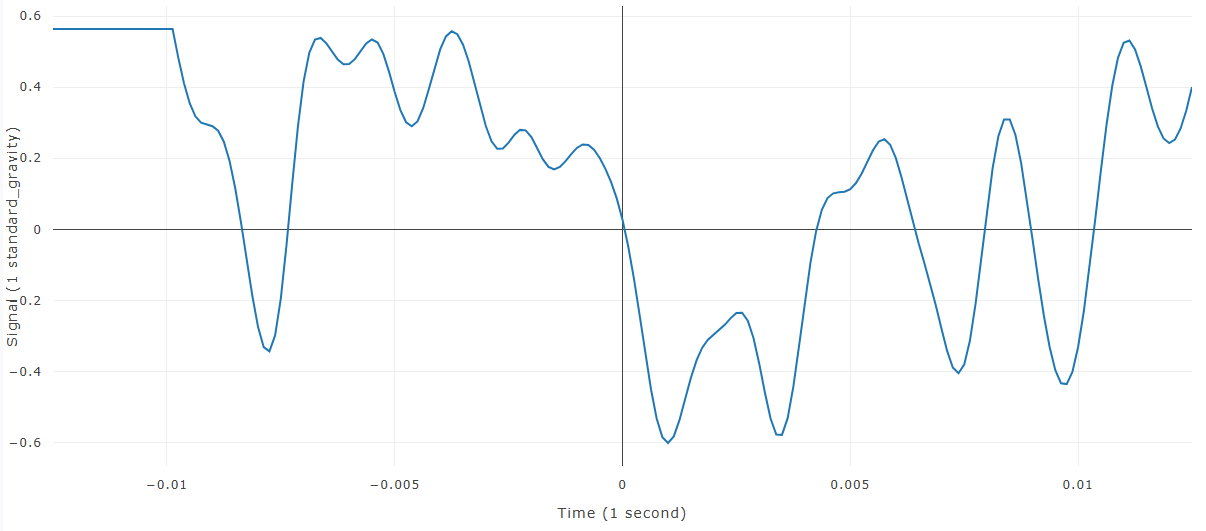
Pad/Cut adjusts a curve so it contains a specified number of samples before and after time zero. It can repeat the first or last signal value to add samples, or it can remove excess samples from either end.
When this feature is available
Pad/Cut becomes available when the selected curves and settings meet the requirements.
For the selection to pass:
- At least one curve must be selected.
- Both requested point counts must be numeric.
WebSAT enables Pad/Cut when at least one curve is selected and both point counts are numeric. The calculation requires both counts to be zero or greater and uses whole-number counts.
Settings
| Setting | Effect |
|---|---|
| Number of Points Before Zero | Target sample count before time zero |
| Number of Points After Zero | Target sample count after time zero |
When the settings dialog opens, WebSAT initializes these values from the current curve where possible.
How WebSAT processes the data
- Load each selected curve and locate time zero.
- Count the existing samples before and after time zero.
- Compare those counts with the requested pre-zero and post-zero point counts.
- Trim excess samples when the requested count is smaller.
- Extend the time range from the first or last sample when the requested count is larger.
- Fill samples added before the curve with its first signal value, and fill samples added after the curve with its last signal value.
- Create and display the padded or cut curve while preserving the original.
Results
Each selected curve produces a new curve with the requested pre-zero and post-zero lengths.
References
No injury criterion or external reference value is applied.