Acceleration Clip (3ms)
Description
The 3 ms acceleration clip reports the greatest acceleration level that is sustained continuously for at least 3 ms. WebSAT also reports a cumulative clip, which allows time from separate intervals above the same acceleration level to add up to 3 ms. Although commonly used for chest acceleration, the function can evaluate acceleration at another selected attachment [1].
When this feature is available
Acceleration Clip becomes available when either the current curve selection or any loaded test contains a measurement set that meets the requirements for the current settings. Only channels with a usable data status count.
The required measurement set includes:
- The signal attachment must match the selected
Sensor Attachment. SelectingANYallows qualifying measurement sets from any attachment. - If
Calculate Resultant From XYZis on, the group must contain all three acceleration components with unitsG'S:- X-, Y-, and Z-local channels; or
- X-, Y-, and Z-global channels.
- If
Calculate Resultant From XYZis off, the group must contain at least one acceleration channel with unitsG'S.
WebSAT checks each attachment measurement set independently and enables Acceleration Clip if any group matches the selected attachment and the channel requirements created by Calculate Resultant From XYZ.
Settings
| Setting | Default | Options |
|---|---|---|
| Sensor Attachment | CHEST | Attachments available in the loaded test, or ANY |
| Apply Filter to Raw Signals | On | On or off |
| Filter CFC | 180 | 60, 180, 600, or 1000 |
| Calculate Resultant From XYZ | On | On or off |
The clip duration is fixed at 3 ms in this button.
How WebSAT processes the data
- Validate the acceleration channels against the selected
Sensor AttachmentandCalculate Resultant From XYZsetting. - Convert the selected acceleration channels to
G'Swhen needed. - Apply the selected filter when
Apply Filter to Raw Signalsis on. - Calculate the resultant acceleration when
Calculate Resultant From XYZis on; otherwise, evaluate the selected acceleration channel directly. - Linearly interpolate threshold-crossing times between samples.
- Determine the continuous clip amplitude by finding the greatest acceleration level that the signal remains at or above for at least one uninterrupted 3 ms interval.
- Determine the cumulative clip amplitude by finding the greatest acceleration level for which the total time at or above that level reaches at least 3 ms. Separate above-threshold intervals are added together for this calculation.
- Report the continuous clip amplitude and its 3 ms interval, along with the cumulative clip amplitude.
Reference values and injury risk
The standalone Acceleration Clip (3ms) function does not select an ATD or apply an injury reference value. It reports the calculated clip amplitudes for interpretation under the governing test protocol.
For context, the ATD definitions contain the following chest 3 ms acceleration references. These values are used by injury assessments that request an ATD-specific chest-acceleration limit; they are not automatically applied to the standalone clip result. The adult and child values come from the applicable NHTSA occupant-protection and child-restraint requirements [2] [3].
| ATD | Chest 3 ms clip reference (g) |
|---|---|
| Hybrid III 50th male | 60 |
| Hybrid III 5th female | 60 |
| Hybrid III 10-year-old | 60 |
| Hybrid III 6-year-old | 60 |
| Hybrid III 3-year-old | 60 |
| CRABI 12-month | 60 |
The standalone result does not calculate percent of IARV or an AIS probability. CTI uses the same 3 ms chest-acceleration concept as one of its two terms, together with the CTI-specific intercepts and component limits documented on the CTI page.
Results
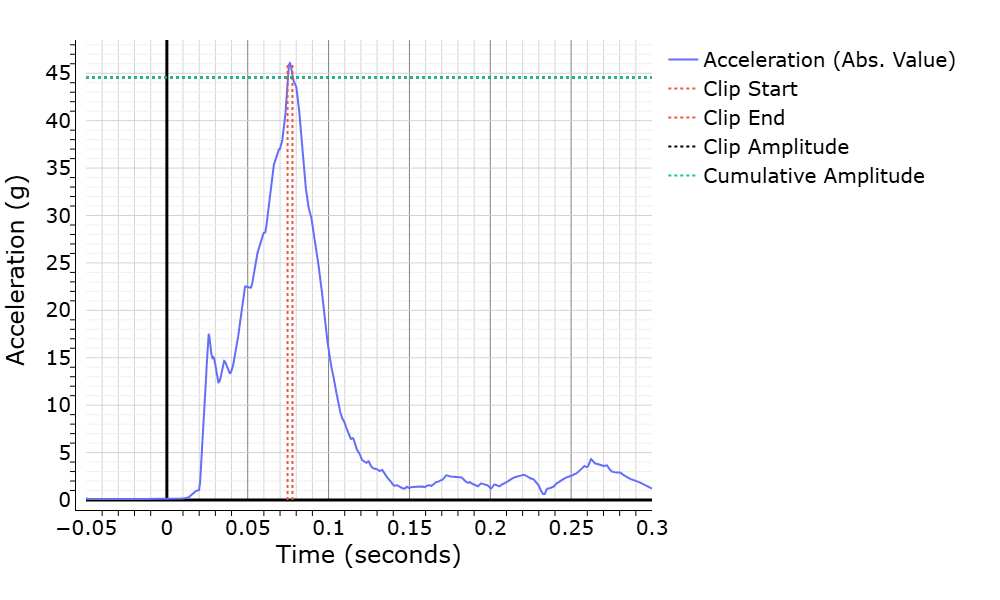
The summary identifies the test, occupant, attachment, evaluated axis/resultant, single-peak amplitude and interval, and cumulative amplitude. The plot marks the evaluated clip window and amplitude against the processed acceleration history.

References
[1] SAE International. Calculation Guidelines for Impact Testing. SAE Recommended Practice J1727.
[2] National Highway Traffic Safety Administration. “Federal Motor Vehicle Safety Standards; Occupant Crash Protection; Final Rule.” Federal Register, 65(208), 2000, pp. 67691–67703.
[3] National Highway Traffic Safety Administration. 49 CFR § 571.213b—Child Restraint Systems.